 CHUMiXРусский
Poker at home
with friends
Use this screen as the shared table. Players join on their phones.
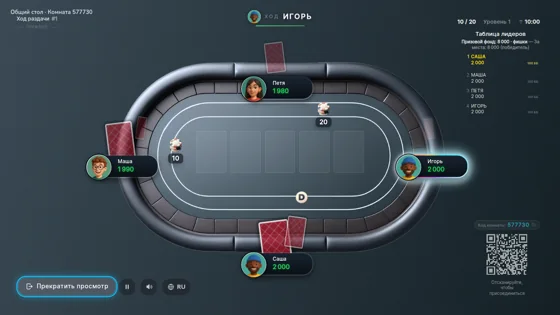
You can connect this screen to a TV with HDMI.
Playing on this computer?
About Chumix
How to set up a poker game on your TV
Turn your TV into the shared table for a poker game with friends. Each phone is a controller with private cards and betting buttons. You need an internet connection, a phone per player and either a TV with a suitable browser or a laptop connected by HDMI.
Start with a room on your phone
Create a room and invite your friends. Choose “Connect shared screen” from the lobby or the room menu. You can connect a screen before the first hand or later during the game.
Open poker in your Smart TV browser
Open chumix.com/tv on the TV. Scan its pairing QR with the host’s phone and confirm the room. If scanning opens a different browser, return to your game and enter the eight-digit code shown on the TV. If the TV shows a room entry form instead, enter your six-digit room code.
Connect a laptop to the TV with HDMI
If the TV browser cannot run the game, connect a laptop by HDMI and select that input on the TV. Open chumix.com/spectate on the laptop and enter your room code. You can also use a laptop or tablet as the shared screen on its own.
Questions before your first game
Which QR code should players scan?
The room invitation QR brings players into the game. The pairing QR on the TV welcome screen connects the display to a room and is confirmed by the host.
Do I need to mirror my phone to the TV?
No. Open the shared table on the TV or a connected laptop. Your private cards stay on your phone. Mirroring a player’s phone can expose that player’s cards to everyone.
Can a QR code launch poker on the TV?
The TV page needs to be open first. Its QR code pairs that screen with your room; scanning it does not remotely open the TV browser.
Can I open this page on my phone?
Yes. Read the setup instructions here, then create or return to your room on the phone. Open the shared table itself on the TV, laptop or tablet.