 CHUMiXРусский
Poker at home
with friends
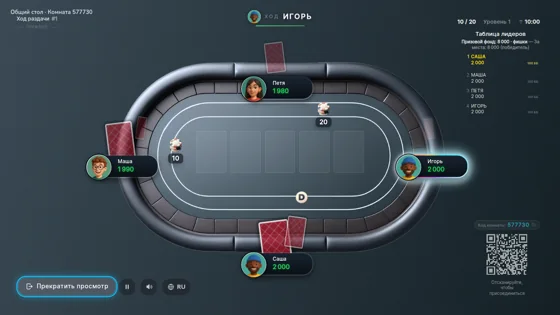
Use this screen as the shared table. Players join on their phones.
You can connect this screen to a TV with HDMI.
Playing on this computer?
About Chumix
A poker night without cards or chips
Play poker with friends in your browser, without downloading an app or creating an account. CHUMiX deals the cards and counts the chips. Each player uses their own phone; an optional TV or laptop shows the shared table for a poker night together.
Invite your own group
Create a room and share its link, QR code or six-digit code. Each friend enters a name and joins an available seat. The host starts the game when at least two players are ready.
Keep your cards on your phone
Your phone holds your cards and the controls for folding, checking, calling and raising. A connected shared screen shows the community cards, pot and progress of the hand.
Play with or without a television
A shared screen is optional. Without one, the table appears on the phones. You can connect a TV, laptop or tablet later from the room menu.
Questions before your first game
Is it free, with no download or sign-up?
Yes. Players open the invitation in a phone browser and choose a name. No account or app download is needed, and CHUMiX is free to use.
Can two friends play poker together?
Yes. A room supports 2–9 seated players. Creating the room does not automatically seat the host: take a seat too if you want to play.
Do we need a deck of cards or poker chips?
No. Cards, chip stacks, bets and the pot are handled in the game. Each player needs a phone with an internet connection.
Do we need a Smart TV?
No. You can play only on phones, use a laptop or tablet as the shared screen, or connect a laptop to a TV over HDMI.
Where can I learn the controls and hand rankings?
The how-to-play guide explains room setup, the actions on your phone and the poker hand rankings from high card to royal flush.